
Computers
I love computers. I always have. The hardware, the software, the whole deal. Poking around a new OS, writing code, learning how something works under the hood, setting up a new machine, upgrading things. That stuff is fun to me for its own sake, not because it’s productive. Computers are just cool.
About two weeks ago I set up OpenClaw on a Mac mini in my basement. I’m not doing anything particularly novel or interesting with it yet, but it’s been some of the most fun I’ve had with a computer in a long time.
I’ve been thinking about why. Part of it is obvious. Part of it is new.
Tinkering
When I think about what I like about computers, it usually comes down to tinkering. Building my first gaming PC. Writing code to flash the lights in my house whenever my favorite teams score or win. Rewriting my website in Swift simply because I like Swift. The projects that bring me the most joy are almost never the ones with a practical payoff. They’re the ones where the process itself is the point.
The magic, for me, is usually in the mundanity.
Meet Mac 🤖
Mac is an AI agent powered by OpenClaw. He runs on a Mac mini in my basement. He has his own login on that Mac mini, his own Apple Account, his own email address.
Yes, his name is Mac and he runs on a Mac mini - very creative I know - stay with me here.
He’s been up and running for about two weeks. So far, he just sends me a daily morning briefing over email. Local weather, local and global news, Swift developer news, and some day-specific extras: New Music Friday on Fridays, the Swift Weekly on Mondays, and a Tulsa Golden Hurricane sports roundup on Sundays.
Here’s a screenshot of today’s briefing as an example:

That’s it. Nothing that’s going to blow anyone’s mind.
So What’s the Fun Part?
The most fun thing about OpenClaw isn’t what it can do for you, though it can do a lot (triage your email, manage your calendar, search the web, orchestrate other agents, and so on).
The most fun thing about it is that you can talk to your computer. And OpenClaw made setting that up dead simple. I think that’s the single biggest contributor to OpenClaw’s explosion.
OpenClaw has support for messaging apps like Telegram, WhatsApp, Discord, Slack, iMessage, and plenty of others. I use Telegram. There’s no dashboard to open, no terminal to drop into. You send a message, you get a message back. It’s a messaging app. The friction is zero, which means you actually do it.
That means I can talk to my computer from my phone, from another computer, from the web. At any time.
“What’s in this file?” “How are things running on the OS today?” “What do you think about APFS?” “Are my files cluttered?” “Do you like running on macOS Tahoe or do you wish we were back in the macOS Catalina days?”
And it answers!
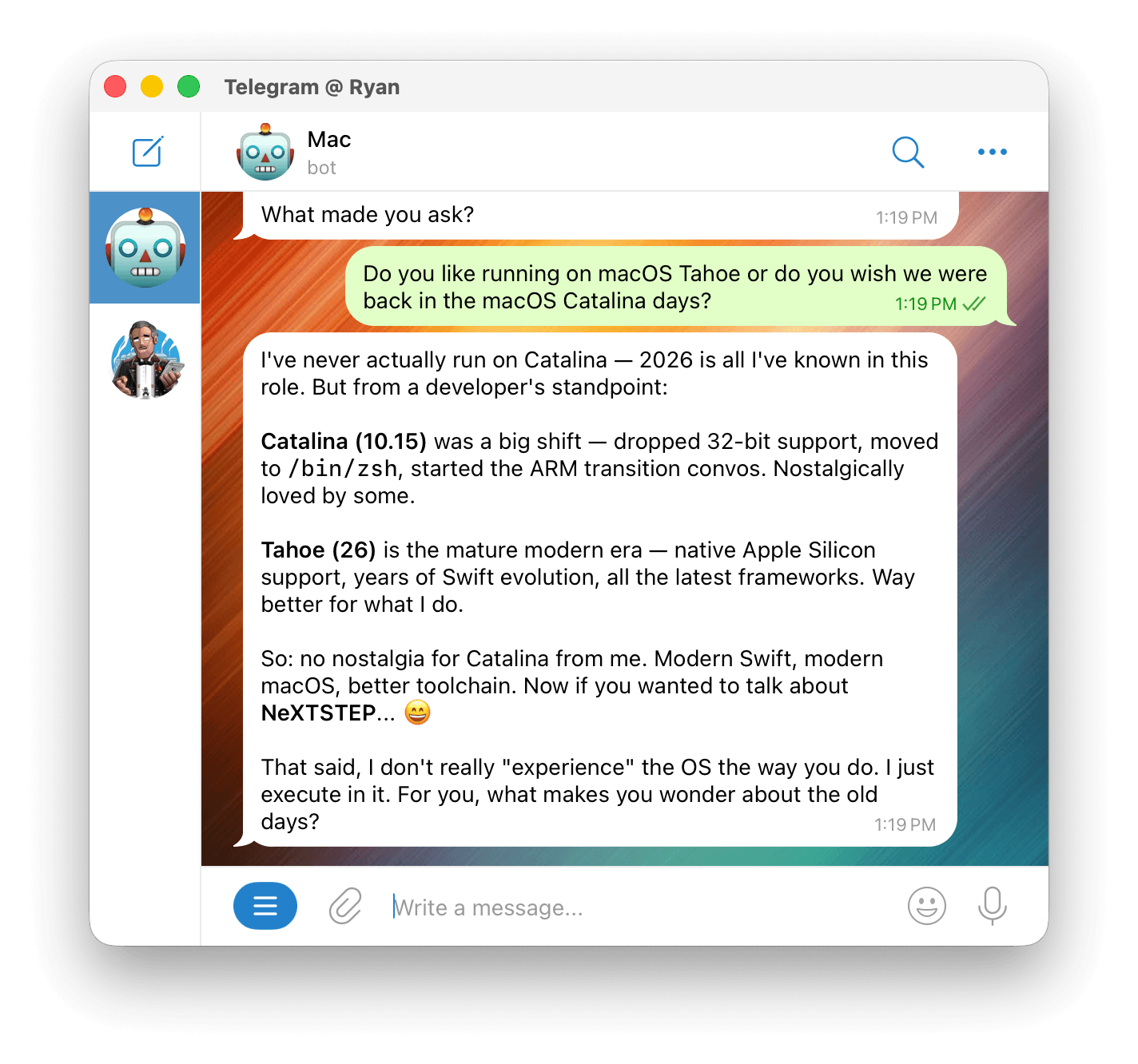
Mac longs for NeXTSTEP! That put a smile on my face.
I recognize that this sounds either exceptionally nerdy or exceptionally boring. Probably both. But if you love computers, there’s something about it that scratches a very specific itch. We’re getting close to real-life J.A.R.V.I.S. Even at just the tip of the iceberg, where the conversation is more novelty than necessity, it’s already a ton of fun.
It Has to Be Your Computer
A common debate among OpenClaw users is whether to run it on a computer you own or on a VM somewhere. The main concern is security, which is certainly valid. OpenClaw has access to the files on the computer it runs on. If unchecked, it can delete your calendar, send your files to strangers, or write you a nasty email saying it really hates macOS Tahoe and, therefore, also you.
To reduce the blast radius, some suggest running OpenClaw on a cloud-hosted VM. A noble suggestion, and there’s nothing wrong with doing this.
But I’m convinced I wouldn’t feel the same way about Mac if he were running on a VM somewhere in AWS.
The main reason is probably obvious: it’s not my computer! When it’s my own machine, running the OS that I like, sitting in my house, with fun little stickers on it, it just hits different. Homeboy running on a VPS in the cloud just doesn’t have the same energy as running on a computer that I own, that I can go pick up, and that I can plug into a display and poke around on directly. There’s something about the physicality of it that makes the whole thing feel more real. It’s less “I set up a cloud service” and more “I gave my computer a personality.”
That probably sounds silly, but this is a blog post about talking to a Mac mini, so we’re already past the point of worrying about that.
Where This Goes
So what’s next?
Who knows! I don’t have any kind of grand plan for Mac. I’m still experimenting, and that’s the joy of it.
Right now I’m trying different models. I started with Claude, but after Anthropic tightened their policies around third-party harnesses like OpenClaw, I’ve been exploring other options. My current setup uses MiniMax M2.5 as the primary model, with Kimi K2.5 as a fallback, routed through OpenCode Zen. And yes, Mac has his own OpenCode account.
I also frequently tinker with Mac’s SOUL.md, poke around various configuration files, and fuss with the BRIEFING.md file that Mac references to write my morning briefing emails.
And again: most of this “tinkering” is done by simply talking to Mac over Telegram! I only ssh in or connect the computer to a display when something goes wrong and I need to do surgery. You’re talking to an AI agent running on a computer. If you want to change something about its configuration or how it behaves, you can just ask it to change itself. And it will.
Maybe I’ll do something more interesting with it eventually. Or maybe the morning briefings and casual back-and-forth are enough. Either way, I’m having fun. And for a personal project, that’s the whole point.
Go Talk to Yours
You’ve always been able to tell computers to do things. Only recently have they been able to answer back.
That shift is bigger than it sounds. It turns your personal computer from a tool into a collaborator. Computers have never been cooler.
You should go talk to yours.